
-
Shop by category
Explore all dealsExplore this collection for more finds.
View this find
- Amazon Best Sellers
- Under $25
-
Shop by brand
View all brandsExplore this collection for more finds.
View this find
-
eDeals & offers
Explore all dealsExplore this collection for more finds.
View this find
- Shopping guides
- Compare products Free tool
-
Shop by category
Explore all dealsExplore this collection for more finds.
View this find
- Amazon Best Sellers
- Under $25
-
Shop by brand
View all brandsExplore this collection for more finds.
View this find
-
eDeals & offers
Explore all dealsExplore this collection for more finds.
View this find
- Shopping guides
- Compare products Free tool
THE EVERYDAY EDITTech & Accessories
Choosing a USB-C Cable: Power, Length and Everyday Trade-offs
Compare charger and device compatibility, cable length, data needs and pack contents before choosing a USB-C charging cable.
Explore the picks
A USB-C connector does not tell you everything you need to know about a cable. Before choosing one, match its charging capability to your devices and charger, decide how much reach your setup needs, and check whether you need data transfer or video. Those details matter more than a broad compatibility claim when you are planning a desk, travel kit or shared charging spot.
Ad · We may earn a commission. As an Amazon Associate I earn from qualifying purchases.
Match the stated charging capacity to your setup
Check the charging requirements for both the device and the charger before focusing on a cable’s maximum wattage. The Anker 333 USB-C to USB-C cable is specified to support charging up to 100W when used with a compatible charger. That describes the cable’s stated capability, not a promise that every device will charge at that level. If your charger or device has a lower supported rate, use those specifications to set expectations.
Choose length for the place you charge
A six-foot cable can be useful when the outlet is not close to the spot where you use a device, but extra reach may be unnecessary in a compact setup. Measure the route from outlet or charger to device, allowing enough slack for comfortable placement without leaving a long loop in your way. The product information identifies this cable as six feet long; consider whether that length suits your desk, bedside table or travel bag.
Separate charging from video requirements
USB-C describes the connector, not every function a cable supports. This Anker cable is described as supporting charging and data transfer, but not video output. If you intend to connect a device to a monitor or display, check the cable’s specifications for video support rather than assuming that a USB-C plug will carry a picture. For charging-only use, video capability may not be part of your decision.
Think through compatibility and daily handling
The listing says the cable is designed to work with USB-C devices, while also noting that charging speed depends on a compatible charger. Check the ports and charging requirements of the particular devices you plan to connect, especially if several people will share the cable. The product description identifies a nylon exterior and a 5,000-bend lifespan. Treat those as stated product details, and consider whether the cable’s construction and length suit how you store and move it.
Decide whether the pack contents fit your routine
This option is a two-pack, with two six-foot cables, a hook-and-loop cable tie, a welcome guide, and an everlasting warranty and customer service listed in the product details. A two-pack may make sense if you have two charging locations or want a spare; if you need only one cable, compare the value of the extra cable with your storage and usage needs. Check the current package details before buying if any included item or support term is important to your decision.
Before you decide
- Confirm your device and charger use USB-C to USB-C connections.
- Compare the charger and device charging specifications with the cable’s stated maximum of 100W.
- Measure the distance between the charging point and where you use the device.
- Check whether you need data transfer, video output, or charging only.
- Decide whether two six-foot cables and the listed accessories suit your setup.
A relevant item to explore
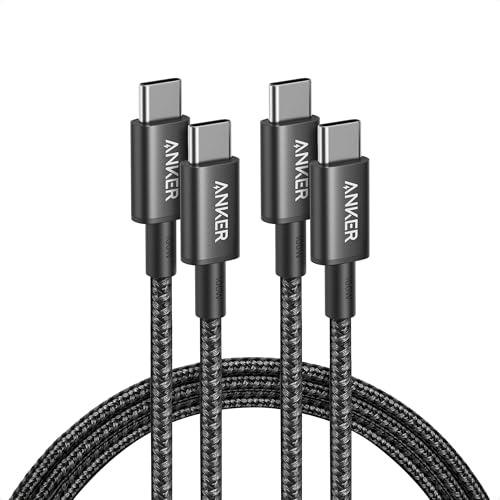
Anker USB C to USB C Cable, 100W Fast Charging Cable (2-Pack, 6 ft, Black)
The Anker 333 USB-C to USB-C Cable is relevant as a concrete example of a two-pack of six-foot cables with a stated charging capability up to 100W, data transfer support, and no video output. Its listed nylon exterior and 5,000-bend lifespan provide specific construction details to consider alongside your own setup needs.
View the exact item and current retailer offer →
Check the exact variant, seller, included pieces, care instructions and current terms. Purchases and checkout take place with the retailer.
Common questions
Does this cable support video output?
No. The supplied product information says it supports charging and data transfer, but not video output.
Will it charge every device at 100W?
The product information states support for charging up to 100W with a compatible charger. Actual charging capability depends on compatibility with the charger and device, so check their specifications.
Explore this subject
Prepared by Biz E-Deals using product listing information and general shopping considerations. We have not personally tested the item. Listing information can change; confirm details with the retailer.
Lifestyle photograph: Photo by Alex Knight on Unsplash. Featured product photography appears in the article.
Your next useful read
Explore shopping guides →
Tech & Accessories
How to Choose USB-C Earphones for Calls, Music and Everyday Controls
A practical guide to checking port compatibility, fit, call needs and inline controls before choosing USB-C wired earphones.
Read the guide
Tech & Accessories
Wireless Earbuds: Balance Battery, Fit and Everyday Controls
Compare the practical trade-offs that shape wireless-earbud choices: how you wear them, how you recharge them, which controls you prefer and what d...
Read the guide
Tech & Accessories
A Pocket-Sized Speaker Upgrade: What to Check Before You Choose
A practical guide to choosing a compact Bluetooth speaker by considering where you’ll use it, how you’ll connect it, and which features matter in y...
Read the guideThe Biz E-Deals edit
Good finds. A little less searching.
Choose your email topics, start with our welcome guide, and join the list for upcoming curated editions.
Savings explained
More to discover
Choose my emails
Choose your email topics on the next page, then confirm in your inbox. Free and optional. No account needed. Privacy policy